
FAQ
Answers to our most frequently asked questions
Let us know if there's anything you need to get started. You can reach us fastest at support@trueappend.com.
Top links
- Data dictionary
- Sample TrueAppend Report
- Getting started
- Input file guide
- Output file guide
- Terms of service
- Privacy policy
Video tour
A step-by-step guide to processing your first file.
Our process
How long does it take to enhance my records with TrueAppend?
TrueAppend’s process begins with address standardization which helps improve match rates for your data append. With quality control and transfer times, an average file of 10,000 records takes about 10 minutes.
Process times vary depending on file size. The average file completes the append process within 10 minutes of successfully submitting your file.
TrueAppend is 100% automated, and we’ll email you when your file is done!
How do I upload records to TrueAppend for enhancement?
To upload a file, TrueAppend requires the following data fields:
- First Name
- Last Name
- Address 1
- City, State or Postal Code
- Input ID
We encourage users to include as much information on their upload file as possible, including: Address ID, Address 2, and Postal Code.
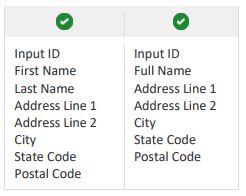
Please note: We recommend uploading a minimum of 100 records.
Records can be appended to TrueAppend one of three ways: Copy/Paste, Drag/Drop, or File Browsing.
TrueAppend accepts CSV (comma-separated values), with either TAB or COMMA as the delimiter, and Excel (xls) files for upload.
– WHAT IS A CSV FILE?
A Comma-Separated Value (CSV) File is a simple file format used to store tabular data, such as a spreadsheet or database. A CSV file, as it’s name states, is created by adding commas to separate the data. View a CSV file. CSV files can be created in Excel by saving the table and changing the ‘Save as Type’ to CSV (Comma Delimited).
– WHAT IS A TAB DELIMITED FILE?
A Tab Delimited File is, also, a simple text format for storing data in a tabular structure, such as a spreadsheet or database. This type of file is created by adding tabs between data fields. View a Tab Delimited file. Tab Delimited files can be created in Excel by saving the table and changing the ‘Save as Type’ to Text (tab delimited).
– WHAT IS AN EXCEL FILE?
An Excel File is known as the Binary Interchange File Format (BIFF). Data inside all Office Document files are stored in series of fixed-size streams. All the data is contained in records that have headers, which give the record type and length. View an XLS file.
How will I know when TrueAppend finishes my data append?
When your data append completes in TrueAppend, you will be notified two different ways: through an in-app notification, and via an email to the address associated with your account.
At the top of your file display page, a notification like the one below will appear.
In addition, you will receive an email from TrueAppend notifying you that your file has completed processing and is ready for export.
How do I download and export my enhanced records from TrueAppend?
TrueAppend is designed so you can create a custom attribute package and download and export your enhanced records in just a few clicks. To do so, navigate to your file display page and click the export button at the top. You’ll be asked to choose the attributes you want to export and confirm the credit cost before you can start your download.
To download the file, your account must have sufficient credits. You will be charged based on the number of records matched per attribute per 1,000 matches on output.
You can click the ‘Download’ button located at the top of your screen. This will download your file to the browser as a CSV file in a zipped file folder. You can then extract your file and check out your results!
Check out our Output Guide for more information.
If you need more credits, buy them on the Credits page in the app; see pricing.
What data append attributes does TrueAppend offer?
Age, birth month, birth year, gender, marital status, Census median household income, income decile, net worth decile, home owner, market value range, business owner, occupation, heritage, religion, political party, presence of children, and more. You choose any combination when you download, and you can download an attribute you've already bought again at any time. See the data dictionary for the full list.
About TrueAppend
What TrueAppend services are included for free?
A free account includes unlimited uploads and file processing with no file size limits, and a complimentary TrueAppend Report on every file. Gender, marital status and Census median household income are appended at no charge. No credit card is required and your account never expires.
Does TrueAppend require me to make my purchase decision upfront?
No. Register for a free account (no credit card required), process your file and review your TrueAppend Report: it shows the attributes appended, the match rate for each and the credits a download would need. If you don't like what you see, there's no obligation. When you're ready to download enhanced records, buy credits and use them on the attributes you choose. Credits never expire.
What does it cost?
$10 per attribute per thousand records matched. Credits come in packages of 1,000 ($100), and you use one credit for every 10 records matched per attribute in your first download of a file. See pricing.
Do you provide a Data Dictionary?
Sure do! Access the TrueAppend Data Dictionary below. This dictionary gives full details about each of the fields provided in your export.
The dictionary is located in several spots throughout both the website and the app. We, also, include a link on your File Complete email.
In addition, TrueAppend provides a plethora of support documentation. Most of which is accessible in the FAQ’s or in the header and footer of the app:
Where does TrueAppend’s data come from?
Most data append service providers use a single data source for the information they give you. TrueAppend is different.
Rather than relying on one single demographic provider – like Acxiom, Exact Data, Experian, InfoUSA, KBM Group, and others – TrueAppend sources data from many different suppliers. We curate each attribute by combining as many sources as possible.
We use the best data available to provide the greatest coverage and the highest quality. This allows us to deliver high match rates and attributes with a narrow focus.
Additionally, TrueAppend doesn’t sell any Zip4 or other aggregated data. This means the data our users export is matched at the address, household, or individual level. You can trust that our output data is representative of your records. Instead of reporting aggregate data, we use that information in our quality control process, which is something we are very serious about.
TrueAppend sources its data from many different suppliers. Our sources include, but are not limited to:
- Public and government records
- Consumer telephone data
- Business telephone data
- Census data
- Salary compilers
- Licensing boards
- Real estate and assessor data
- Academic profiles
- Social profiles
- Professional profiles
- Public, association, and municipal directories
- Secretary of State data
- Annual reports, 10Ks and other SEC filings
How is my data kept secure?
Uploads are encrypted in transit with TLS. Uploaded data is kept separate, never commingled, and stored on an encrypted file system. Once the append data is returned, the input is destroyed; output keys are kept until you delete the file so we can send updates without re-processing. See our privacy policy and terms of service.
How do I contact TrueAppend's customer service team?
Email support@trueappend.com or call (855) 878-3448, Monday to Friday, 8 AM to 6 PM Central, excluding federal holidays. We generally reply to email within an hour.